












From its intuitively designed multitasking features to its new app library, Windows 11 is optimized to deliver a fresh experience for work, study, and entertainment. The operating system’s interface closely resembles that of Windows 10X, a platform Microsoft developed for some time before discontinuing it.
How can you determine if your computer is compatible with Windows 11? To address this, Microsoft provides a PC Health Check tool, allowing users to assess whether their system can upgrade to or install the new operating system.
Microsoft released the official PC Health Check App just hours after unveiling Windows 11. Once installed, the software indicates whether your computer is compatible with the new OS. However, the initial version did not explain why a system might be incompatible.
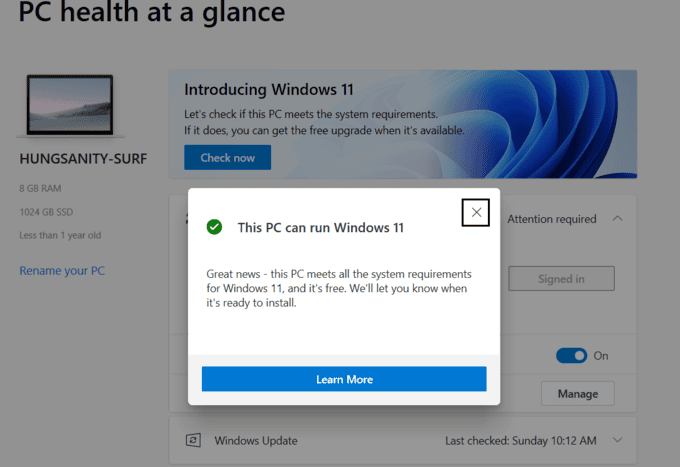
PC Health Check App interface.
In the updated version launched on June 27, the tool now specifies which components are incompatible, enabling users to replace or modify them for Windows 11 compatibility.
To use the tool, download the latest version of PC Health Check App here. After installation, sign in with your Microsoft account to check your computer’s compatibility.
Common reasons for incompatibility include less than 64 GB of free storage, unsupported processors, and the absence of Secure Boot or TPM 2.0.
For hardware, Windows 11 requires the following minimum specifications:
– 64-bit processor with a speed of 1 GHz or higher, featuring at least two cores.
– Only select newer processor models are supported.
Windows 11 supports the following Intel chips:
- Intel 8th Gen (Coffee Lake)
- Intel 9th Gen (Coffee Lake Refresh)
- Intel 10th Gen (Comet Lake)
- Intel 10th Gen (Ice Lake)
- Intel 11th Gen (Rocket Lake)
- Intel 11th Gen (Tiger Lake)
- Intel Xeon Skylake-SP
- Intel Xeon Cascade Lake-SP
- Intel Xeon Cooper Lake-SP
- Intel Xeon Ice Lake-SP
Windows 11 supports the following AMD chips:
- AMD Ryzen 2000
- AMD Ryzen 3000
- AMD Ryzen 4000
- AMD Ryzen 5000
- AMD Ryzen Threadripper 2000
- AMD Ryzen Threadripper 3000
- AMD Ryzen Threadripper Pro 3000
- AMD EPYC 2nd Gen
- AMD EPYC 3rd Gen
– Minimum 4 GB RAM.
– Trusted Platform Module (TPM) version 2.0.
– Graphics card compatible with DirectX 12 or later, with WDDM 2.0 driver.
Microsoft also notes that devices in S Mode must exit this mode before upgrading. Additionally, S Mode is only available on the Windows 11 Home Edition.

With over 15 years of experience in web design and development, I’ve helped hundreds of businesses create comprehensive website strategies for sustainable growth and profitability.
The Lucky 3: How These Zodiac Signs Can Seize a Wealth of Opportunities on January 12th’s Auspicious Date

Today is a fortunate day for those born in the year of the Ox, as they are presented with opportunities to prosper and thrive.
The Perfect Name: A Parent’s Guide to Naming Their Child Without Causing Them Future Grief

Naming a child is an important task; some spend months researching, consulting books, websites, and even seeking advice from Feng Shui and physiognomy masters. However, there are those who underestimate the power of a name, which can inadvertently cause hardship for their children.
Captivating Names for Baby Girls with the Surname Ly: Charming and Meaningful Options for Proud Parents

Parents always wish to bestow upon their children beautiful and meaningful names. We are here to guide you in choosing a wonderful and fitting name for your baby girl, with the surname ‘Ly’ (Lý), that is also in harmony with the parents’ ages.
The Perfect Union: Unveiling the Most Harmonious Zodiac Match for Marriages in the Tiger’s Year

If you’re curious about the most compatible Chinese zodiac signs for marriage in the year of the Water Tiger, then read on!
The Top 100 Baby Girl Names for 2022: Captivating and Classic Choices for Your Little One

A name is a sacred thing, holding significance in every person’s life. Are you in search of a beautiful and meaningful name for your baby girl, with the family name Ngo, that also aligns with your family’s beliefs and traditions? Let’s explore this together with Bach Hoa XANH!