












Discover the ultimate guide to downloading MP3s from YouTube effortlessly. With these methods, you’ll be enjoying your favorite tunes in no time.
Top Websites for Downloading MP3s from YouTube Videos
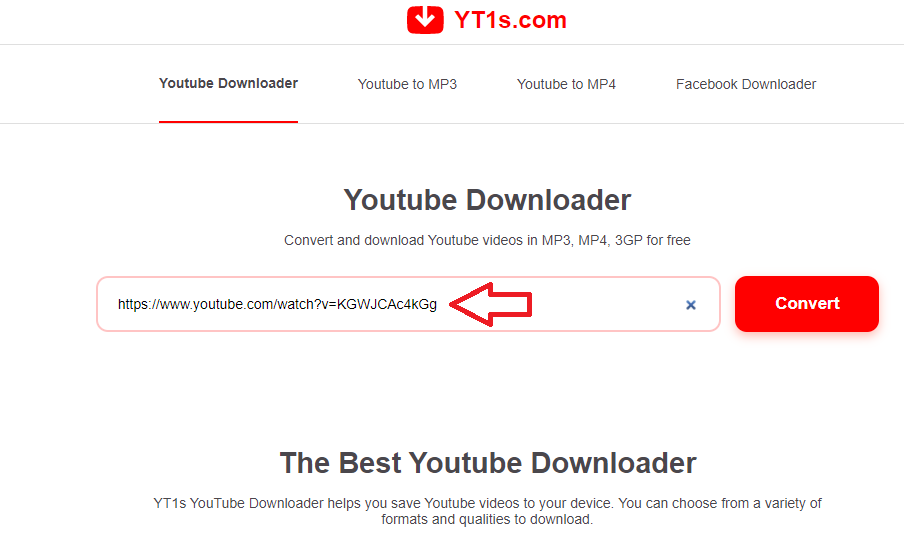
YT1s.com is a new, ad-free website that allows you to download YouTube videos and MP3s with a clean interface and stable download speeds.
Follow these simple steps to download music from YouTube:
Step 1: Open the YouTube video you want to download, and copy its URL.
Step 2: Visit yt1s.com, paste the URL into the address bar, and click Convert to process the link.

Step 3: Select the MP3 download option (the last choice) and click the green Get link button to obtain the download link.

Step 4: Click Download to save the YouTube music to your computer or phone.
In just 4 easy steps, you can download your favorite songs for offline listening, set them as ringtones, or enjoy them on your iPhone or Android device.
2. Downloading with x2convert Online Tool
Benefits of x2convert
- Fast download speeds.
- Vietnamese interface.
- Supports multiple platforms: computers, smartphones.
Detailed Instructions
Step 1: Access x2convert.com via this link: HERE.
Add ‘x2’ to the YouTube link to skip directly to step 2 without visiting x2convert.com. Example: https://x2convert.com/LinkYoutube/mdEy1m6vtsM
Step 2: Paste the YouTube video URL into the “Link” field and click “Get MP3 Link”.


Step 3: Click Download Now

Step 4: Click Save in the new window and wait for the download to complete.

3. Downloading MP3s from YouTube with y2mate.com

Step 2: Visit y2mate.com here, paste the video URL into the address bar, and click Start for processing.

Step 3: Select the MP3 format and click Download. In the download window, click Download.mp3 to save the file.

4. Extracting Music from YouTube with ytmp3.cc
Copy the YouTube video link you want to extract music from. Visit https://ytmp3.cc/, paste the link, and click Convert:

Wait for the conversion to complete, then click Download to save the file. Alternatively, use Dropbox for cloud storage or convert another video.

5. Downloading Music from YouTube with Listentoyoutube
Link: https://listentoyoutube.us/
Similar to the above tools, copy the YouTube video URL, visit https://listentoyoutube.us/, paste the URL into the box, and click GO!:

Wait for the MP4 and MP3 download options to appear, then click on MP3:

Wait for the Download to Local option, click it to save to your computer, or store the file in Dropbox or Google Drive.
6. Efficient YouTube Video Downloading with Download4.CC
Download4.CC is an online tool that enables quick YouTube video downloads for offline viewing. It also allows direct MP3 extraction from videos on the results page.

With a simple interface, you can download videos in minutes. Just paste the YouTube video URL into the tool, click Download, choose the desired format (video or audio), and save it.

7. Yoodownload.com Tool
Yoodownload is an excellent website for downloading YouTube videos to your computer. It supports HD video downloads and allows easy MP3 extraction from videos.
8. Theyoump3.com Tool
Theyoump3.com is a website that enables quick YouTube video downloads in MP3 format. Simply enter the YouTube URL, follow three steps, and download the MP3 file to your computer. It’s that simple!


With over 15 years of experience in web design and development, I’ve helped hundreds of businesses create comprehensive website development plans. My expertise ensures sustainable growth and profitability for your website.
3 Top Websites to Extract Lyrics and Beats from Songs Online – No Software Required

Renowned songs that capture widespread attention upon release often…
Quickest Ways to Write Bold Text on Facebook for More Attention

Not only does writing in italics on Facebook help to emphasize your message, but it also shows emphasis, creates differentiation, or simply makes your post more interesting and easier to read. Join FPT Shop to discover the top 3 best ways in this article.
Easy Way to Download MP3 Music from YouTube, Extract Music from YouTube Videos
When watching YouTube videos, you often come across great music that you want to have on your phone or computer to listen to offline, use as a ringtone, or for other purposes. However, extracting music from videos usually requires using third-party software, which can be quite cumbersome. Fortunately, there are now several tools available that make it easy to extract music from videos.
5 Easy and Quick Ways to Reduce Video Size Online
Reducing the file size of online videos allows users to easily download or share videos on social media platforms. If you are unsure how to reduce the file size of online videos, follow these simple steps below.