












While there are numerous free live chat tools available, such as Subiz, vChat, and Tawk.to, Facebook Messenger remains a favorite among customers. Why? Because it offers a plethora of benefits. Here are some key advantages of Facebook Messenger:
- Whether or not your customers provide their email or phone number, you can still chat and interact with them seamlessly.
- Instantly gather essential customer information, including gender, interests, profession, age, and location.
- Effortlessly categorize and manage customers using tags.
- Facebook Messenger allows you to save important notes within the chat window.
- Easily filter messages by status: primary, unread, follow-up, completed, or spam.
- Automate the sending of notifications, promotions, and product updates.
- Manage multiple administrators efficiently.
- Schedule appointments directly through Facebook Messenger.
- Save pre-written responses for quick replies.
- Enjoy a straightforward setup and user-friendly interface.
These compelling reasons make Facebook Messenger an excellent choice. Additionally, its built-in Bot Support feature enables automated customer interactions tailored to your preferences. When optimized correctly, this feature significantly reduces daily workload.
Before diving into setting up Facebook Chat, consider the following limitations:
- Customers must have a Facebook account, which is a mandatory requirement.
- Limited customer management features, lacking professional-grade tools.
- Retrieving past information can be more challenging.
Simple Steps to Integrate Facebook Chat into Your Website
Before integrating Facebook Chat into your website, ensure you have a Facebook Page with admin privileges. If you don’t have one, create it first. Once ready, follow these steps to set up Facebook Chat:
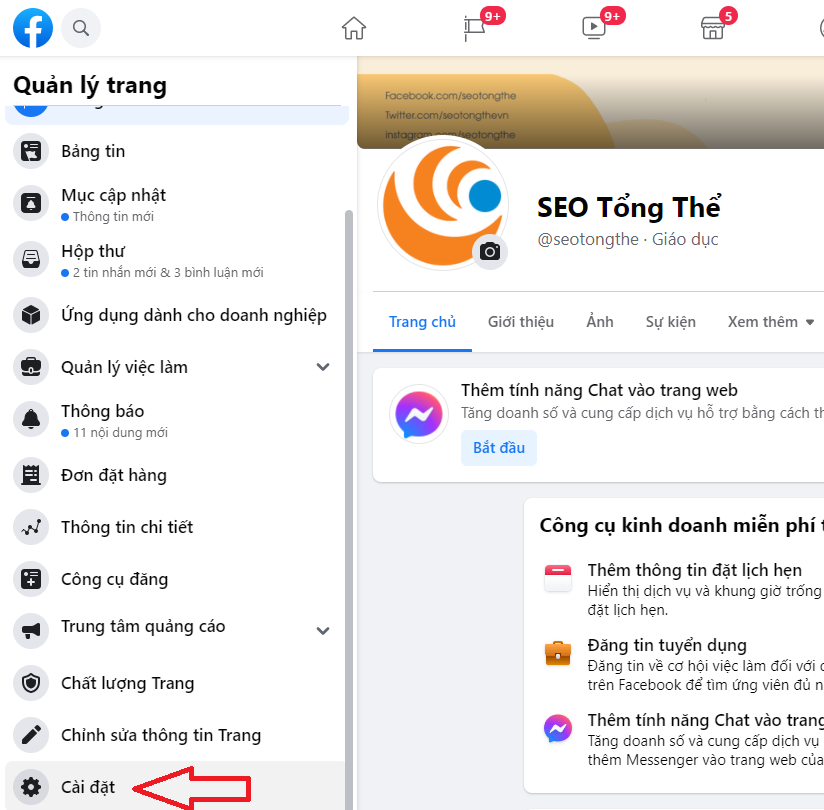
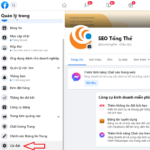
Start by accessing your Facebook Page from your personal profile and click on “Settings”:
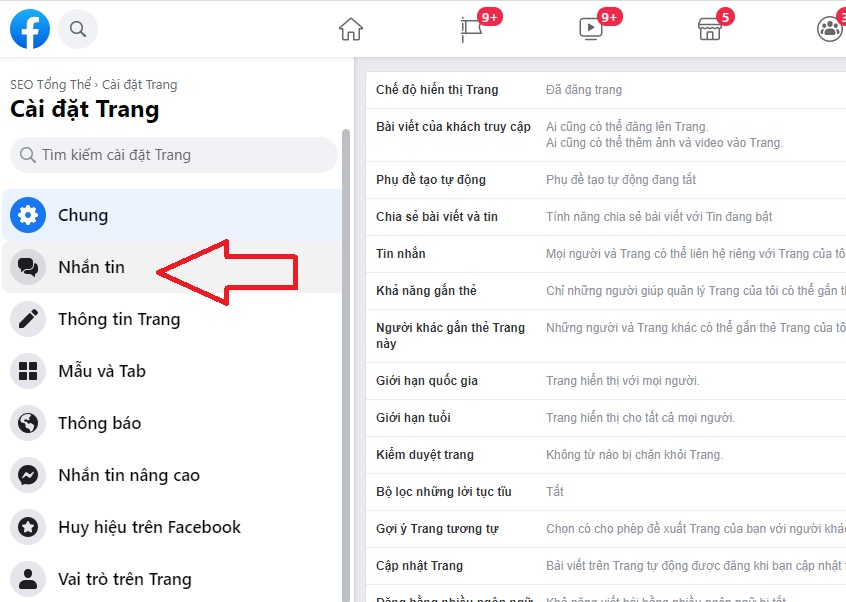
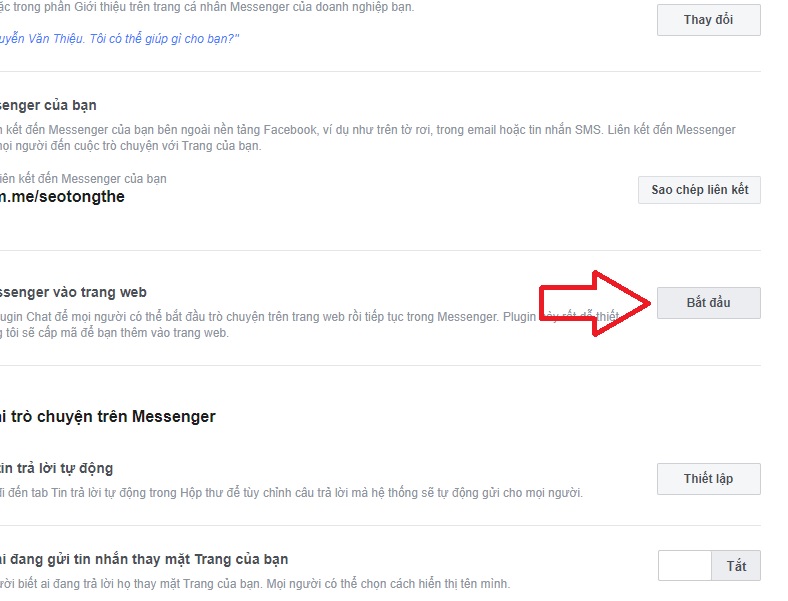
Then, go to the “Add Messenger to Your Website” section and click “Get Started”:
Here, customize the chat widget by configuring:
- Welcome Message
- Domain Settings
- Frequently Asked Questions and Answers
- Position the chat box on the left or right side of the screen for both desktop and mobile.
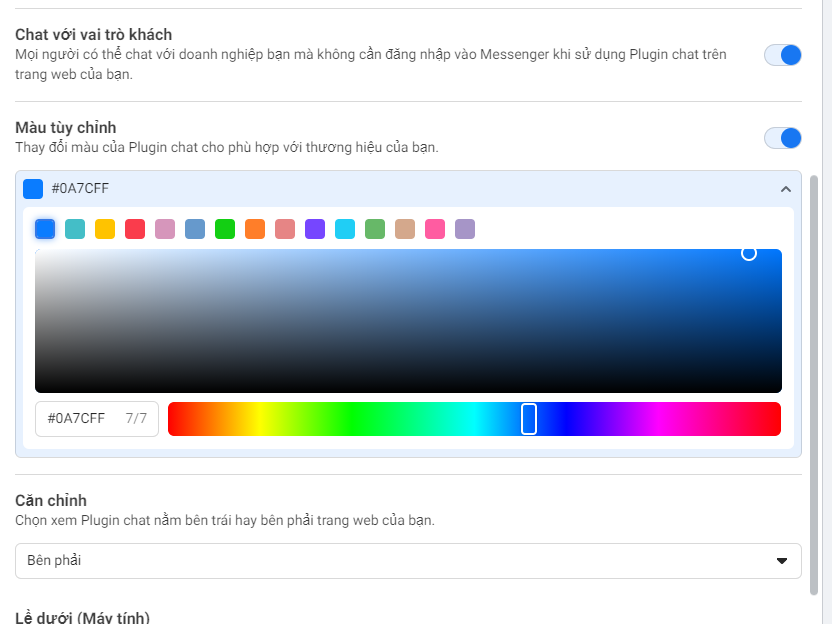
- Adjust colors, top margin, and bottom margin for both desktop and mobile.
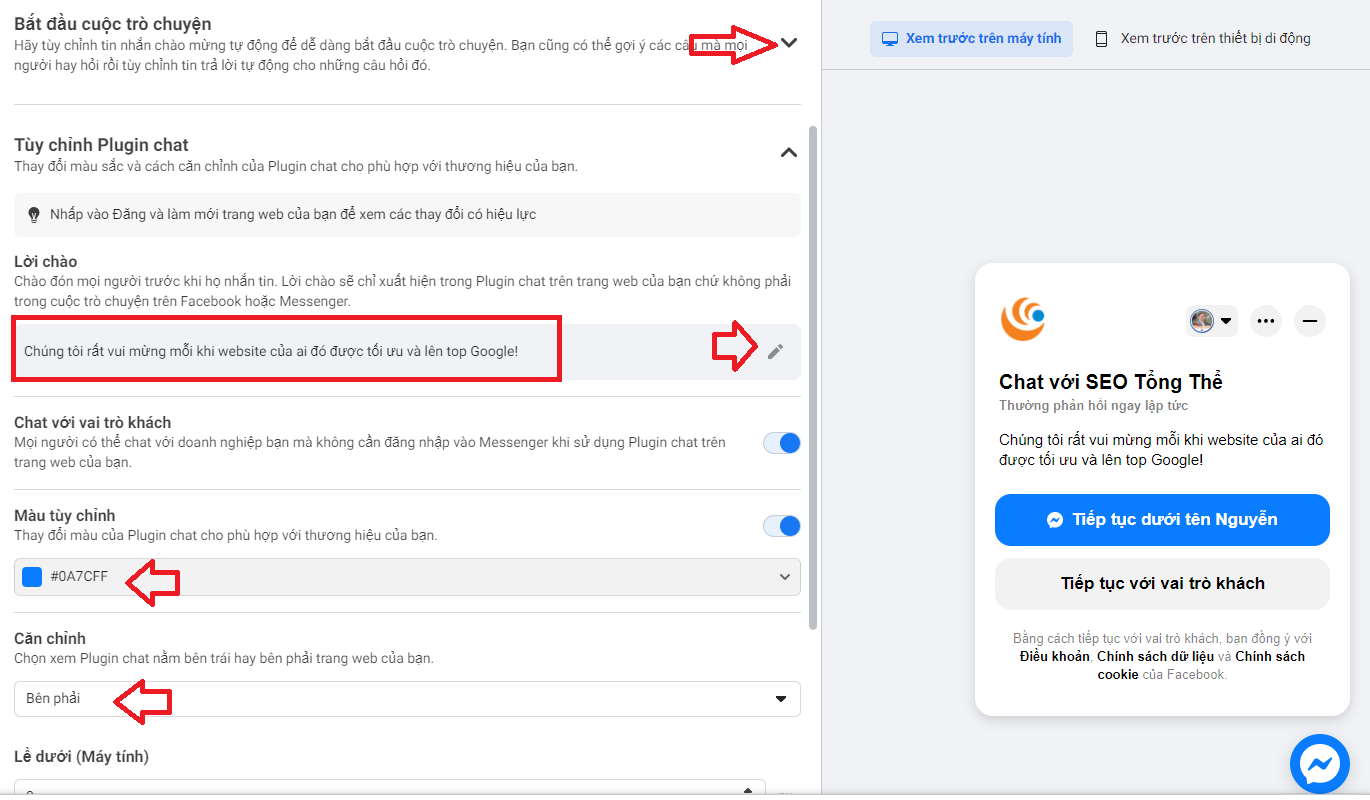
To add a splash of color to the chat button, customize it at this step:
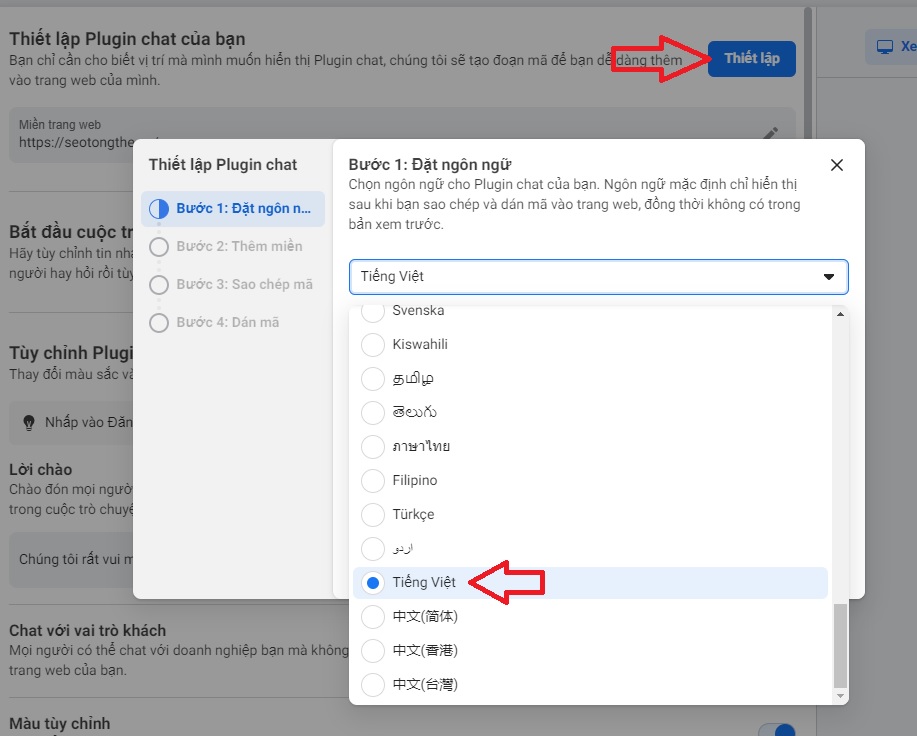
Next, click the blue “Setup” button in the top-right corner, and in the setup window, select “Vietnamese” as the language.
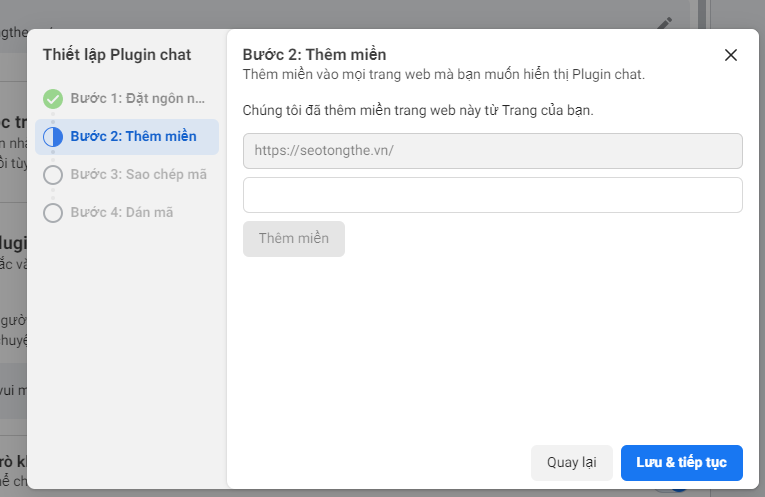
Step 2: Add your domain to the Facebook Page to enable the chat widget. For example, add “seotongthe.vn” and click “Save and Continue.”
Step 3: Click the “Copy Code” button as shown below, then paste the chat code into your website.
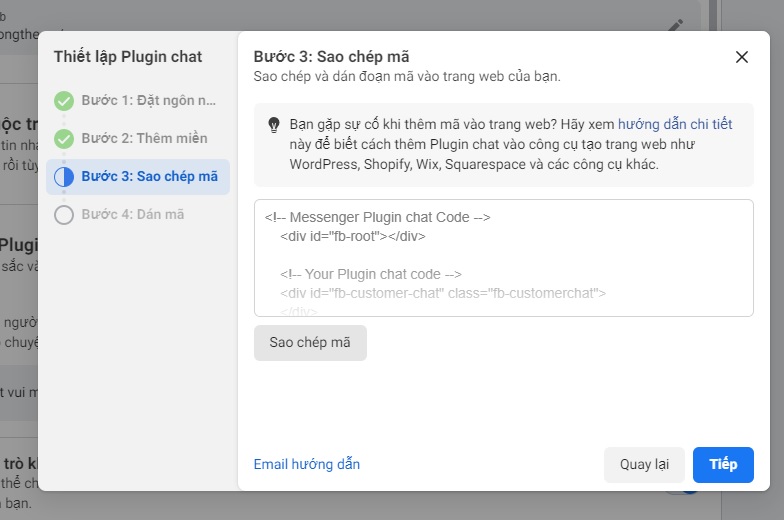
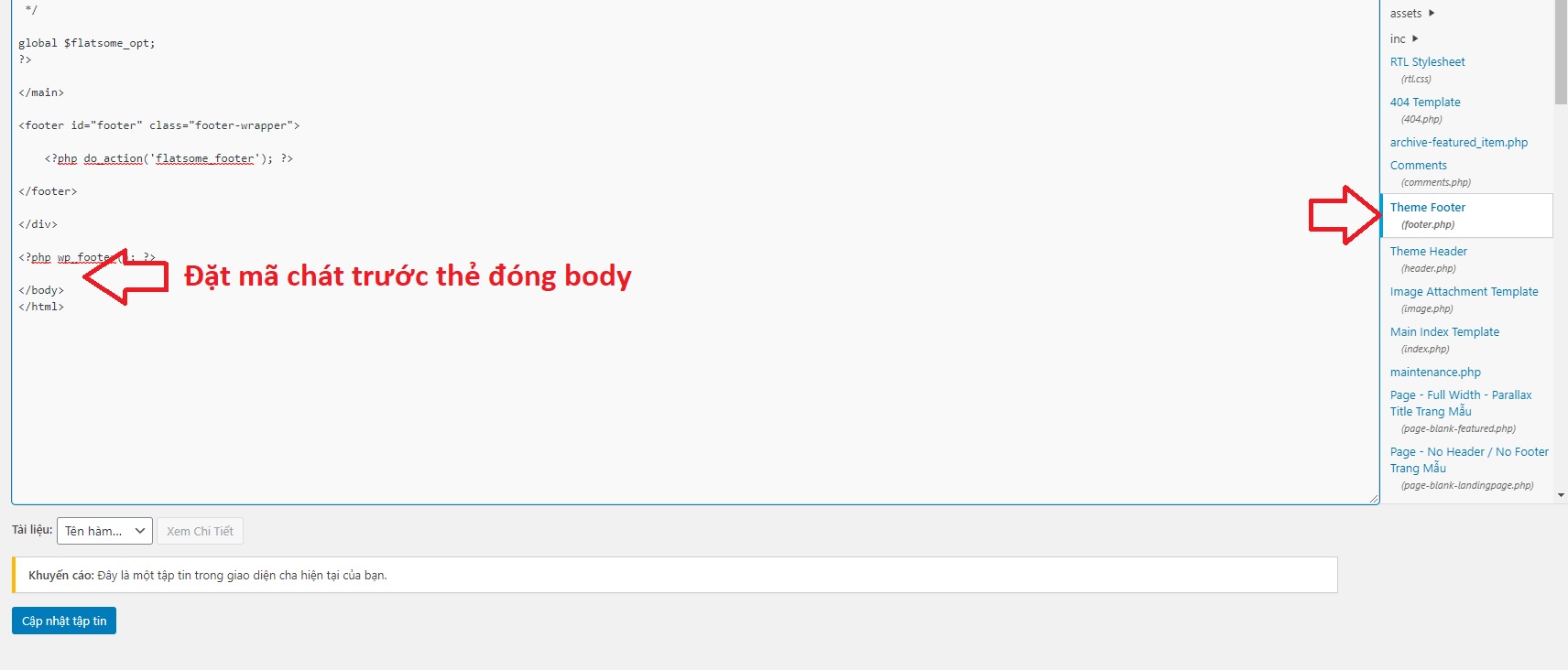
Note: Paste the chat code just before the closing tag or after the opening
tag.If you’re using WordPress, you can add it to the footer.php file as shown below:
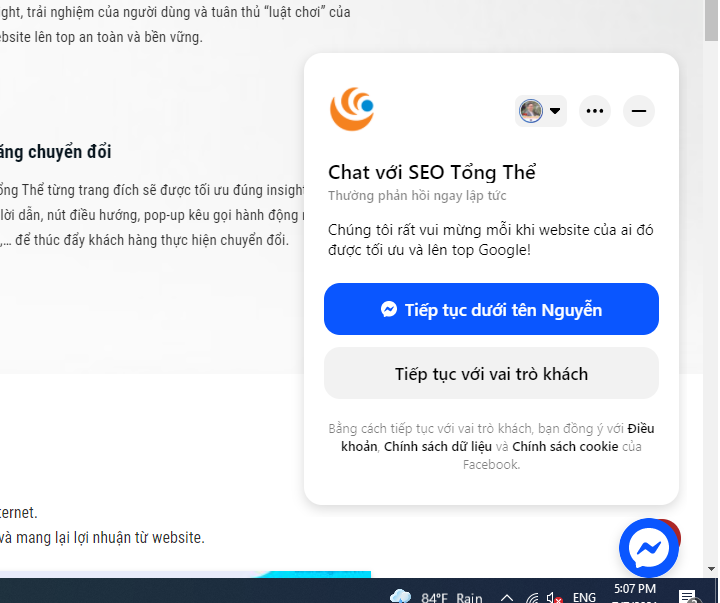
And now, let’s enjoy the results 🙂
Benefits of Integrating Facebook Chat
Integrating Facebook Chat brings a host of benefits you might not expect, including:
- Completely Free: Integrating Facebook Chat into your website is entirely free, so there’s no reason not to try it today.
- Sleek, Lightweight Interface with Vietnamese Support: The current Facebook Chat interface is both beautiful and simple, making it accessible to all users, even those less tech-savvy. Plus, it supports Vietnamese, adding convenience.
- Boost Likes and Customer Engagement for Your Facebook Page: Using Facebook Chat can significantly increase your page’s likes and improve engagement with potential customers, ultimately boosting sales.
- Easy Customer Management: Interacting with customers via chat makes it simple to manage and track them, ensuring no one is overlooked. This helps in building a robust list of potential customers.
- Most Users Already Have Facebook Accounts: With a vast Facebook user base in Vietnam, integrating Facebook Chat into your website allows you to quickly connect with potential customers.
- Enhance Product and Brand Promotion: Through Facebook Chat, more users can learn about your products and brand, making it an effective tool for brand promotion.
Drawbacks of Integrating Facebook Chat

Like any tool, Facebook Chat has its drawbacks, including:
- It can slow down your website if international connections experience issues.
- Chat functionality is only available when users are logged into Facebook on that browser.
- The chat interface customization options are limited and show no signs of improvement.
Despite these limitations, integrating Facebook Chat into your website remains a valuable step to expand your business.

With over 15 years of experience in web design and development, I’ve helped hundreds of businesses create comprehensive website development plans. My strategies ensure sustainable growth and profitability from their websites.
How to Login to Messenger on Desktop and Mobile: A Simple Guide (Updated 2024)

If you don’t know how to log into Messenger without installing the app, read this article with FPT Shop. With its outstanding features, Messenger web allows users to make free calls and chat with friends on their phones or computers.
Tips for Reading Messenger Messages without Revealing “Seen”

If you don’t want others to know that you have read their messages and don’t want to reply, follow this method.
What happens when you block someone on Facebook?

When you block a Facebook account, that account is unable to access your profile, posts, photos, and other content.
How to Integrate Facebook Chat into Your Website Without Plugins in 2021
Facebook is the national social media platform in Vietnam, almost everyone has a Facebook account, even parents nowadays are using it. Therefore, if you are running a website, embedding Messenger into your WordPress website will make it easier for you to communicate with your customers. You can still reply even if you are not online, and integrating Facebook chat into your website also provides many useful features for sellers. Check out this article to understand why websites need Facebook Messenger and how to add Messenger to your website.