












Facebook Twitter
Sign in
  • Home
  • Beauty
  • Lifehacks
  • Food & Recipes
  • Technology
  • Travel
Sign in
Welcome!Log into your account
Forgot your password?
Password recovery
Recover your password
Search
December 3, 2025
  • Sign in / Join
Facebook Twitter
Sign in
Welcome! Log into your account
Forgot your password? Get help
Password recovery
Recover your password
A password will be e-mailed to you.
meo.tips
  • Home
  • Beauty
    • Featured

      Combat Wrinkles This Dry Season: Expert Tips for Flawless Skin

      Featured

      2 Anti-Aging Tips to Boost Collagen for Youthful Skin

      Featured

      “5 Evening Ingredients That Can Irritate and Weaken Your Skin”

      Featured

      4 Hairstyles That Can Age You Instantly

      Featured

      4 Flattering Short Hairstyles to Refresh Your Look

  • Lifehacks
    • How to

      The Enchanting Home of a Renowned U40 Woman: A Dreamy Abode…

      How to

      The Chef’s Secret to Delicious Stir-Fry Dishes

      How to

      The Magic of Blooming Winter-Heather for Tet: An Enchanting Guide

      How to

      The Ultimate Guide to Selecting and Displaying the Stunning ‘Huyen’ Peach…

      How to

      The Art of Arranging Lilies: A Guide to a Long-lasting and…

  • Food & Recipes
    • Featured

      Leaping Buddha’s Wall: Unveiling the Exotic Delicacy of a Culinary Masterpiece

      Featured

      Beijing Soy Milk: A Famous Delicacy Not Everyone Enjoys

      Featured

      15 Delicious Dishes to Warm You Up on Rainy, Chilly Days

      Featured

      Festive Layered Christmas Trifle: A Sweet, Vibrant Dessert Masterpiece

      Featured

      3 Irresistible Tomato-Braised Bean Recipes for a Perfectly Tender, Rice-Friendly Dish

  • Technology
    • Featured

      How to Check if Your Computer Can Run Windows 11

      Featured

      Top 9 Most Popular Fingerprint Door Locks in High Demand

      Featured

      Seamless Facebook Chat Integration for Your Website: A Plugin-Free Guide

      Featured

      13 Essential Tips to Extend Your iPhone’s Battery Life

      Featured

      How to Quickly Save Outlook Emails to an External Hard Drive

  • Travel
    • Featured

      “The Bizarre Vegetable That Makes Diners Cringe Yet Becomes a U.S….

      Featured

      Dalát in Rose Season: Every Corner Frames Stunning Shots Like Tăng…

      Featured

      “Slurp Your Way Through Hanoi’s Top 5 Oldest Snail Noodle Soups:…

      Featured

      “The Humble Fruit with a ‘Poor’ Name: A Hidden Gem of…

      Featured

      “The Bizarre Vegetable That Makes Diners Cringe Yet Becomes a U.S….

Home Lifehacks How To Change Your Facebook Name Within 60 Days
  • Lifehacks

How To Change Your Facebook Name Within 60 Days

Facebook has recently updated their policy on account renaming, limiting users to changing their name no more than once every 60 days. If you're wondering how to adjust your profile name within this timeframe, Dien May XANH will be providing a step-by-step guide to show you how. Keep reading to find out more!

By
Administrator
-
22 July, 2023
0
785
Facebook
Twitter
Pinterest
WhatsApp

    Method 1: Change the language to English

    To change the language of your Facebook account to English, follow these steps:

    Step 1: Log in to your Facebook account. If you are unable to access your account, refer to your previous posts for alternative ways to access Facebook.

    Step 2: Click on the arrow icon in the top-right corner and select “Settings.”
    Click on the arrow icon and select Settings.

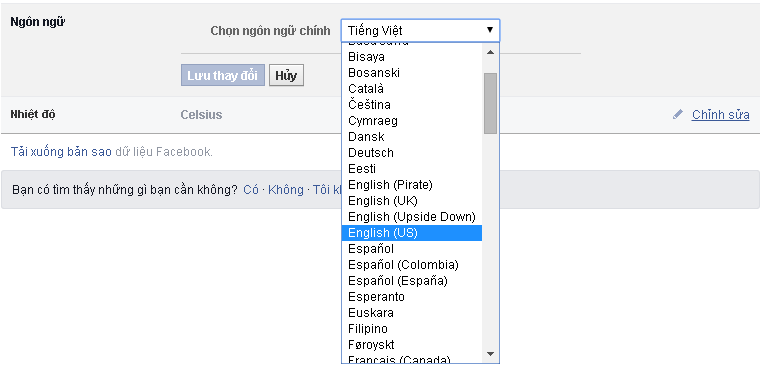
    Step 3: In the “General Settings” section, click on the “Language” option and select English.
    The general settings section opens, click on the language section and switch to English.

    Now you can try changing your Facebook name to see if it works. If you still receive a message saying you have to wait 60 days, you can follow the second method below.

    Method 2: Submit personal information

    If it has been less than 60 days since your last name change and you still want to change your name, you can follow these steps:

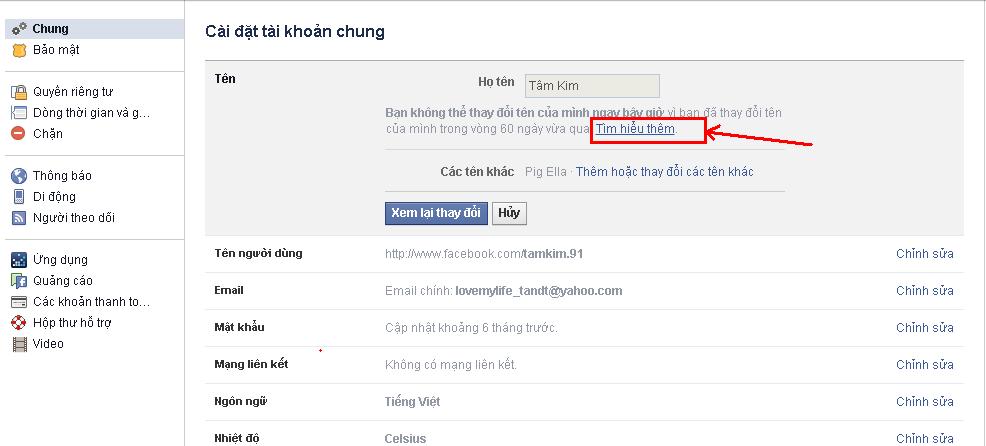
    Step 1: In the “General Settings” section, click on “Edit” in the “Name” section.

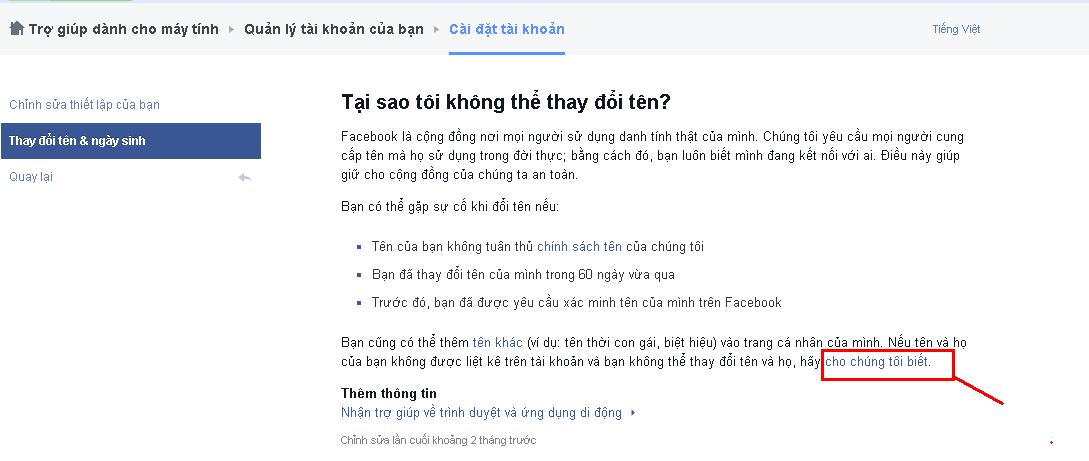
    Step 2: Click on “Learn more.” A new tab will open. Click on “Let us know” at the bottom of the image.
    Step 1: In the General settings section, click edit in the Name section.

    Step 3: Prepare a clear and legible photo of the front of your ID card. Enter your real name and the reason for the name change, and select “Change legal name.”

    Step 4: In the “Your ID” section, click on “Choose Files” and upload the previously prepared ID photo.

    Step 4: Then, click Choose Files in the section of your ID and upload the previously prepared ID photo.

    Step 5: Click “Submit” to send the request to Facebook and wait for further instructions.

    This method requires Facebook to review your request. To increase your chances of a successful name change, make sure to provide accurate information, including your full name, first name, and middle name. The uploaded ID photo should be clear and of high quality. If you don’t have an ID card, you can use other forms of identification with a photo. Once you have submitted the request, wait for Facebook to send you an email with instructions.

    It typically takes 2-3 days for Facebook to process the request and confirm the name change without having to wait for 60 days.

    Currently, Facebook has implemented stricter guidelines for name changes within 60 days. Therefore, while the above methods have a chance of success, there is also a possibility that you may not be able to change your name. Don’t get discouraged and try again, and maybe luck will be on your side.

    If you have successfully changed your Facebook account name using the methods above or if you know of any other effective ways, feel free to share them in the comments below. Good luck!

    You may also like

    Facebook Account Renaming: A Simplified Guide via Link 333 (Updated March 2024)



    This article will provide a comprehensive guide to Link 333, an innovative and accessible method for changing your Facebook account name. Whether you’re looking to update your profile with a new display name or revert to your original one, this link offers a straightforward solution to your needs.


    SOURCEdienmayxanh
    • TAGS
    • change Facebook language to English
    • change Facebook name before 60 days
    • Facebook name change
    • increase chances of successful Facebook name change.
    • submit personal information to Facebook
    Facebook
    Twitter
    Pinterest
    WhatsApp
      Previous articleCompare Brushless and Brushed Motors
      Next article“Simplified Guide to Enabling and Using AirDrop on iPhones and MacBooks”
      Administrator
      Administrator

      RELATED ARTICLESMORE FROM AUTHOR

      How to

      The Enchanting Home of a Renowned U40 Woman: A Dreamy Abode That Leaves All in Awe

      How to

      The Chef’s Secret to Delicious Stir-Fry Dishes

      How to

      The Magic of Blooming Winter-Heather for Tet: An Enchanting Guide

      Most popular

      Don’t Rush to Drink Water Right After Waking Up: 5 Things...

      28 June, 2025

      Today’s Black Pepper Prices 08/04/2021: A Slight Uptick, Trading at 72,000...

      11 July, 2024

      “A Delicious and Nutritious Treat: Steamed Fish with a Tender and...

      16 July, 2024
      - Advertisement -

      Recent posts

      How to Check if Your Computer Can Run Windows 11

      Administrator - 1 December, 2025 0
      Microsoft has just unveiled Windows 11, focusing on streamlining the user interface for a seamless experience. With a refreshed design, enhanced productivity tools, and improved performance, Windows 11 promises to redefine how users interact with their devices. Whether you're a creative professional or a casual user, this latest update aims to simplify your digital life while delivering cutting-edge innovation.

      Top 9 Most Popular Fingerprint Door Locks in High Demand

      Administrator - 1 December, 2025 0
      Fingerprint door locks are the most preferred electronic door locks among consumers today. Combining cutting-edge biometric technology with unparalleled convenience, these locks offer a seamless and secure access solution for modern homes and businesses. With their advanced fingerprint recognition systems, they ensure that only authorized individuals can enter, eliminating the need for keys or memorized codes. This innovative approach not only enhances security but also simplifies daily routines, making fingerprint door locks the ultimate choice for those seeking both safety and efficiency.

      Seamless Facebook Chat Integration for Your Website: A Plugin-Free Guide

      Administrator - 1 December, 2025 0
      Facebook stands as Vietnam's quintessential social network, with nearly every individual holding an account. Its unparalleled reach and engagement make it an indispensable platform for connecting, sharing, and thriving in the digital age.

      13 Essential Tips to Extend Your iPhone’s Battery Life

      Administrator - 1 December, 2025 0
      Extend your iPhone's battery life? Absolutely. Owning an iPhone with a longer-lasting battery is not just a dream—it's achievable. Discover the secrets to maximizing your device's power efficiency and enjoy uninterrupted usage throughout your day.

      How to Quickly Save Outlook Emails to an External Hard Drive

      Administrator - 1 December, 2025 0
      Saving Outlook emails to an external hard drive is incredibly useful for backups and data preservation. This ensures your important communications remain secure and accessible, even if your primary device fails or is compromised. By transferring emails to an external drive, you gain peace of mind knowing your data is safely stored and easily retrievable whenever needed.

      Most popular

      Simple and Affordable Methods to Deal with Moldy Walls

      25 January, 2024

      What is Freeship Shopee? A guide on how to hunt for...

      24 February, 2024

      “How to Clean a Sanaky Refrigerator Easily and Safely in 5...

      13 August, 2023
      - Advertisement -

      Recent posts

      How to Check if Your Computer Can Run Windows 11

      Administrator - 1 December, 2025 0
      Microsoft has just unveiled Windows 11, focusing on streamlining the user interface for a seamless experience. With a refreshed design, enhanced productivity tools, and improved performance, Windows 11 promises to redefine how users interact with their devices. Whether you're a creative professional or a casual user, this latest update aims to simplify your digital life while delivering cutting-edge innovation.

      Top 9 Most Popular Fingerprint Door Locks in High Demand

      Administrator - 1 December, 2025 0
      Fingerprint door locks are the most preferred electronic door locks among consumers today. Combining cutting-edge biometric technology with unparalleled convenience, these locks offer a seamless and secure access solution for modern homes and businesses. With their advanced fingerprint recognition systems, they ensure that only authorized individuals can enter, eliminating the need for keys or memorized codes. This innovative approach not only enhances security but also simplifies daily routines, making fingerprint door locks the ultimate choice for those seeking both safety and efficiency.

      Seamless Facebook Chat Integration for Your Website: A Plugin-Free Guide

      Administrator - 1 December, 2025 0
      Facebook stands as Vietnam's quintessential social network, with nearly every individual holding an account. Its unparalleled reach and engagement make it an indispensable platform for connecting, sharing, and thriving in the digital age.

      13 Essential Tips to Extend Your iPhone’s Battery Life

      Administrator - 1 December, 2025 0
      Extend your iPhone's battery life? Absolutely. Owning an iPhone with a longer-lasting battery is not just a dream—it's achievable. Discover the secrets to maximizing your device's power efficiency and enjoy uninterrupted usage throughout your day.

      How to Quickly Save Outlook Emails to an External Hard Drive

      Administrator - 1 December, 2025 0
      Saving Outlook emails to an external hard drive is incredibly useful for backups and data preservation. This ensures your important communications remain secure and accessible, even if your primary device fails or is compromised. By transferring emails to an external drive, you gain peace of mind knowing your data is safely stored and easily retrievable whenever needed.
      - Advertisement -
      ABOUT ME
      Vietnamese tips & tricks
      Contact me: [email protected]
      FOLLOW US
      Facebook Twitter
      © Copyright 2022 - Meo.Tips